Builelib Input Sheets
In Builelib, calculations are performed by entering room geometry, building envelope, and equipment specifications into an input sheet (Microsoft Excel format) and uploading it.
- The same input sheets (
.xlsmand.xlsxfiles) used by the Energy Consumption Performance Calculation Program based on the Japanese Building Energy Efficiency Standards (WEBPRO) can be used. - Detailed calculation conditions can be specified by adding Builelib-specific special sheets (SP sheets) to the WEBPRO input workbook.
Input Sheets (Excel Files)
Samples
| Name | Description | Download Link |
|---|---|---|
| Sample 01 | WEBPRO sample | Builelib_inputSheet_sample_001.xlsx |
| Sample 02 | Example of Builelib-specific SP sheets | Builelib_inputSheet_sample_002.xlsx |
How to Prepare Input Sheets
Preparing the input sheet
- To perform calculations using Builelib-specific SP sheets, use Excel's Move or Copy command to copy the SP sheets into the WEBPRO input workbook.
SP-CM Calculation Mode Input Sheet
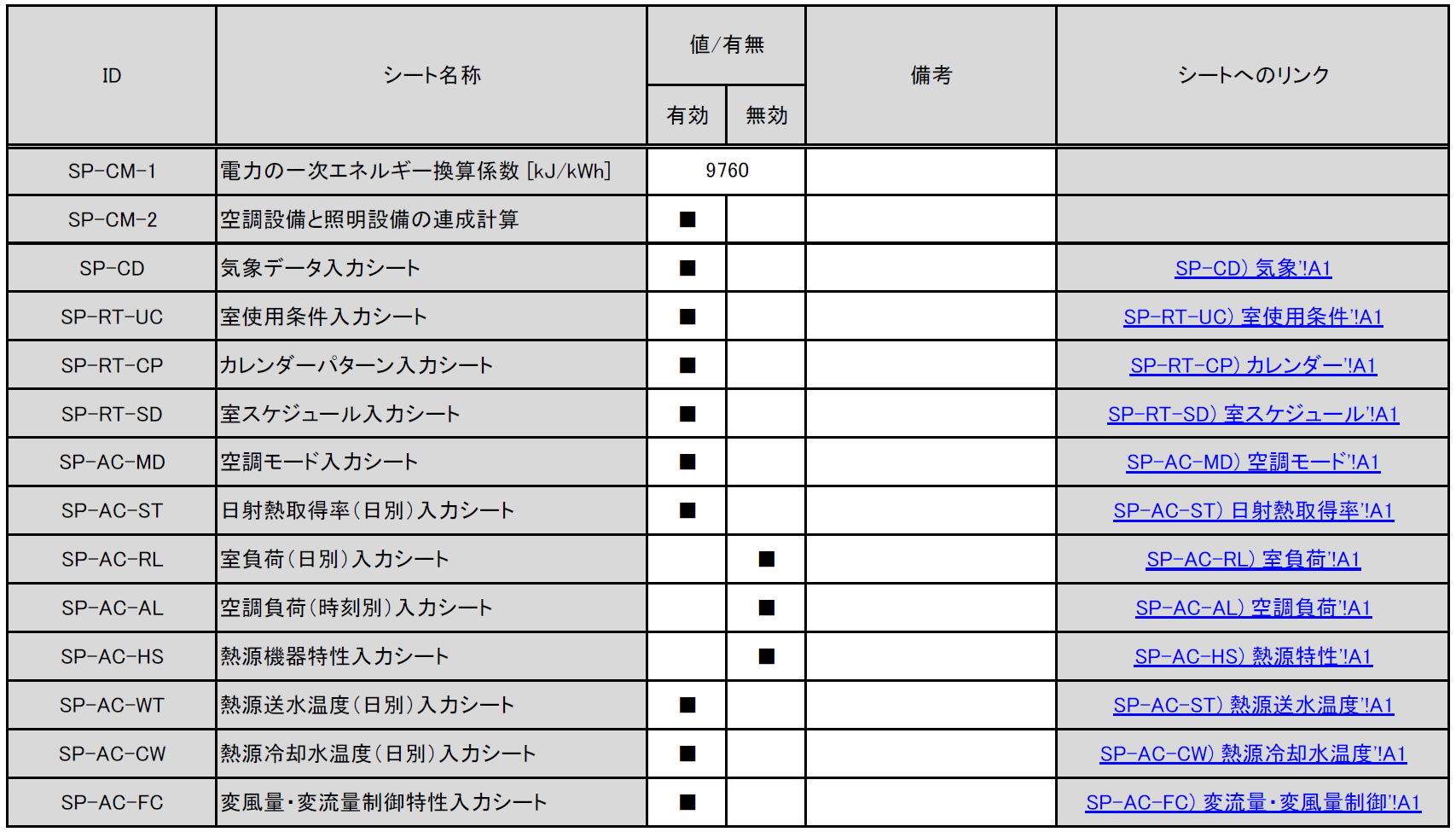
This sheet allows you to specify the primary energy conversion factor, enable or disable coupled calculations, and enable or disable each SP sheet.
-
[SP-CM-1] Primary energy conversion factor for electricity
- Enter the primary energy conversion factor for electricity [kJ/kWh]. The value is reflected in the calculation of design primary energy consumption but not in the calculation of standard primary energy consumption. If no value is entered, the default value of 9,760 kJ/kWh is used.
-
[SP-CM-2] Coupled calculation of air-conditioning and lighting systems
- Enter
■in the Enabled column to enable coupled calculations. When coupled calculations are enabled, the lighting power entered in the Form 4: Lighting Input Sheet is used as the reference internal heat gain from lighting fixtures when calculating air-conditioning energy consumption. When disabled, the reference internal heat gain specified by the standard room-use conditions is used.
- Enter
-
[SP-CD] Climate Data Input Sheet through [SP-AC-FC] Variable Air Volume/Variable Water Volume Control Characteristics Input Sheet
- Enter
■in the Enabled column to apply the information entered in each input sheet to the calculation. When disabled, the contents of that input sheet are not reflected in the calculation.
- Enter
SP-CD Climate Data Input Sheet
- You can calculate energy consumption using custom climate data, including outdoor temperature, outdoor humidity, and solar radiation.
- For example, climate data for locations around the world can be obtained from sources such as https://climate.onebuilding.org/, allowing calculations for any location.
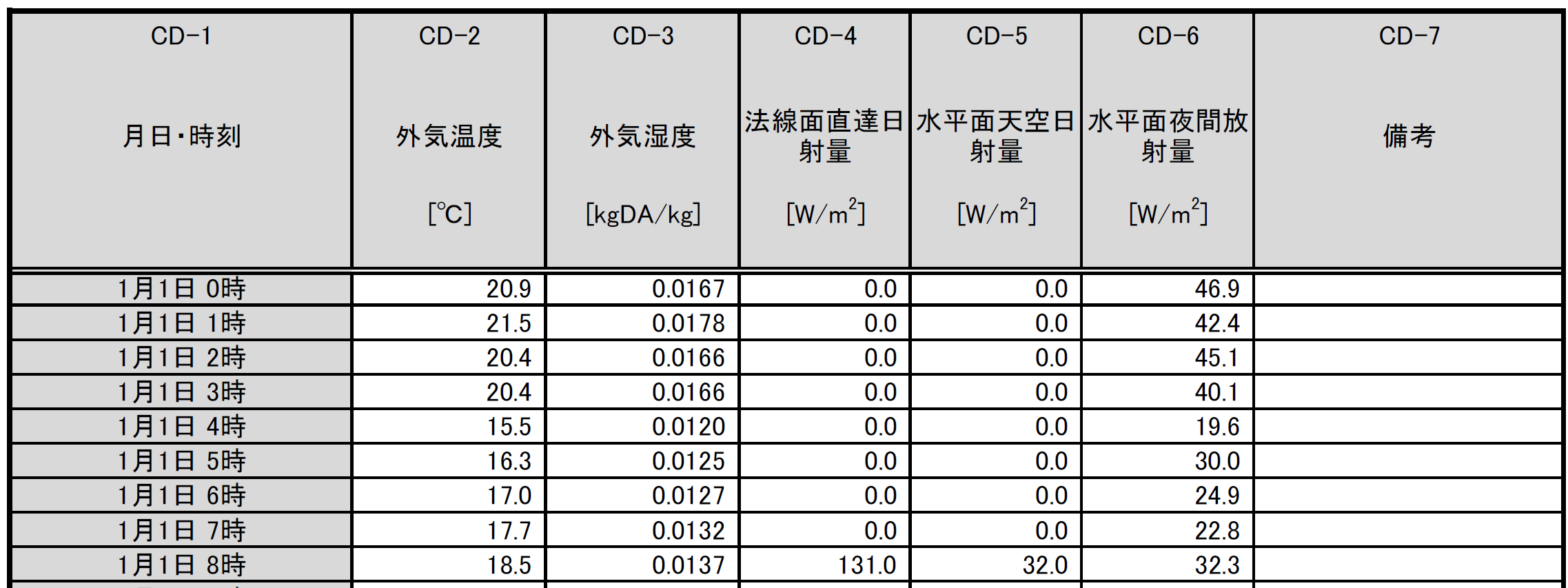
- [CD-2] Outdoor air temperature
- Enter the outdoor air temperature in °C.
- [CD-3] Outdoor air humidity
- Enter the outdoor absolute humidity in kgDA/kg.
- [CD-4] Direct normal solar irradiance
- Enter the direct normal solar irradiance in W/m².
- [CD-5] Diffuse horizontal solar irradiance
- Enter the diffuse horizontal solar irradiance in W/m².
- [CD-6] Horizontal nighttime radiation
- Enter the horizontal nighttime radiation in W/m².
SP-RT-UC Room-Use Conditions Input Sheet
- You can define a new room use by entering custom room-use conditions. You can also override only selected conditions of an existing room use.

- [RT-UC-1] Building use
- Enter the building-use name. The available options are the same as in WEBPRO; a custom name cannot be entered.
- [RT-UC-2] Room use
- Enter either a room-use name available in WEBPRO or a custom name.
- [RT-UC-3] Base room use
- Select the base room-use name from the WEBPRO options. If any item from [RT-UC-4] onward is left blank, the standard room-use condition for the room use entered here is used.
- [RT-UC-4] Main air-conditioning period
- Select Daytime, Nighttime, or All day. This selection changes the daily average outdoor temperature and humidity used in the load calculation.
- [RT-UC-5] Calendar pattern
- Enter a WEBPRO option (A–F) or the name of a calendar pattern created in the SP-RT-CP Calendar Pattern Input Sheet described below.
- [RT-UC-6]–[RT-UC-9] Daily schedules (Pattern 1): room occupancy ratio, lighting heat-density ratio, occupant heat-density ratio, and equipment heat-density ratio
- Enter the daily schedules for the room occupancy ratio, lighting heat-density ratio, occupant heat-density ratio, and equipment heat-density ratio for Pattern 1. The names entered here are defined in the SP-RT-SD Room Schedule Input Sheet described below.
- [RT-UC-10]–[RT-UC-13] Daily schedules (Pattern 2): room occupancy ratio, lighting heat-density ratio, occupant heat-density ratio, and equipment heat-density ratio
- Enter the daily schedules for the room occupancy ratio, lighting heat-density ratio, occupant heat-density ratio, and equipment heat-density ratio for Pattern 2. The names entered here are defined in the SP-RT-SD Room Schedule Input Sheet described below.
- [RT-UC-14]–[RT-UC-17] Daily schedules (Pattern 3): room occupancy ratio, lighting heat-density ratio, occupant heat-density ratio, and equipment heat-density ratio
- Enter the daily schedules for the room occupancy ratio, lighting heat-density ratio, occupant heat-density ratio, and equipment heat-density ratio for Pattern 3. The names entered here are defined in the SP-RT-SD Room Schedule Input Sheet described below.
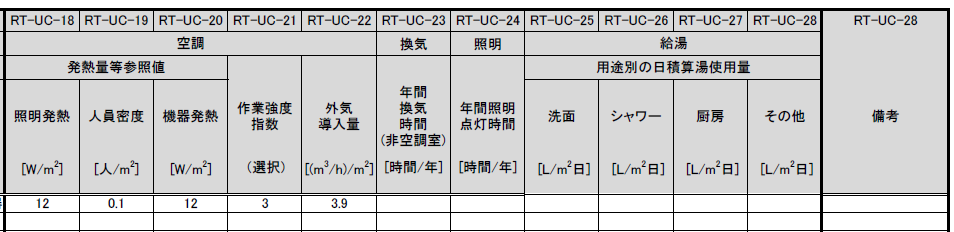
- [RT-UC-18]–[RT-UC-20] Air-conditioning reference values for heat gains (lighting, occupants, and equipment)
- Enter the reference internal heat gains assumed in the air-conditioning load calculation. These values correspond to 100% in each schedule.
- [RT-UC-18]–[RT-UC-20] Air-conditioning reference values for heat gains (lighting, occupants, and equipment)
- Enter the reference internal heat gains assumed in the air-conditioning load calculation. These values correspond to 100% in each schedule.
- [RT-UC-21] Air-conditioning activity level index
- Enter the activity level index (1–5) assumed in the air-conditioning load calculation. The index changes the amount of heat generated by occupants.
- The occupant heat gain is 92 W/person for 1, 106 W/person for 2, 119 W/person for 3, 131 W/person for 4, and 145 W/person for 5.
- [RT-UC-22] Air-conditioning outdoor air intake
- Enter the outdoor air intake assumed in the air-conditioning load calculation in (m³/h)/m².
- [RT-UC-23] Annual ventilation hours (non-air-conditioned rooms)
- Enter the annual ventilation hours assumed when calculating ventilation-system energy consumption. This item applies only to non-air-conditioned rooms.
- [RT-UC-24] Annual lighting hours
- Enter the annual lighting hours assumed when calculating lighting-system energy consumption.
- [RT-UC-25]–[RT-UC-28] Daily hot-water use by application (washbasins, showers, kitchens, and other uses)
- Enter the daily hot-water use assumed when calculating hot-water-system energy consumption. Note that the unit is L/(m²·day). In the standard room-use conditions, the unit for daily hot-water use is L/(person·day) for some room uses.
SP-RT-CP Calendar Pattern Input Sheet
- You can define a custom calendar pattern and apply it to the energy consumption calculation.
- Enter the name of the calendar pattern created here in the SP-RT-UC Room-Use Conditions Input Sheet.
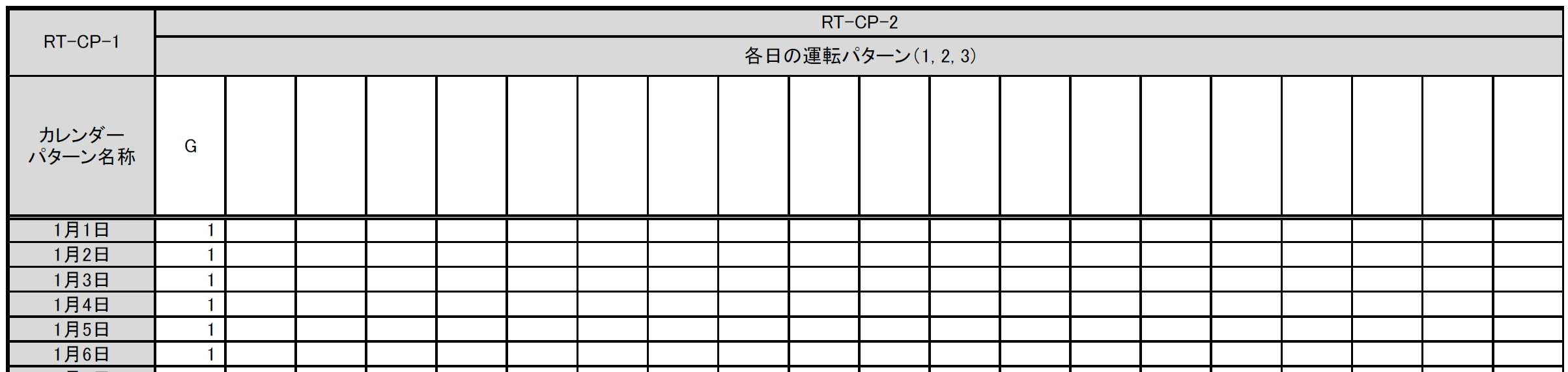
- [RT-CP-1] Calendar pattern name
- Enter any name.
- [RT-CP-2] Operating pattern for each day
- For each day, specify which of Pattern 1, Pattern 2, or Pattern 3 entered in the SP-RT-UC Room-Use Conditions Input Sheet is used. Enter
1for Pattern 1,2for Pattern 2, or3for Pattern 3.
- For each day, specify which of Pattern 1, Pattern 2, or Pattern 3 entered in the SP-RT-UC Room-Use Conditions Input Sheet is used. Enter
SP-RT-SD Room Schedule Input Sheet
- You can define custom room-schedule patterns—hourly ratios over a day—and apply them to the energy consumption calculation.
- Enter the patterns created here in the SP-RT-UC Room-Use Conditions Input Sheet.

- [RT-SD-1] Pattern name
- Enter any name.
- [RT-SD-2] Ratio for each hour
- Enter the ratio for each hour from hour 0 (00:00–00:59) through hour 23 (23:00–23:59). A ratio of 1 gives the same value as the reference value. Values greater than 1 can also be entered.
SP-AC-MD Air-Conditioning Mode Input Sheet
- You can enter the operating conditions of the air-conditioning system.
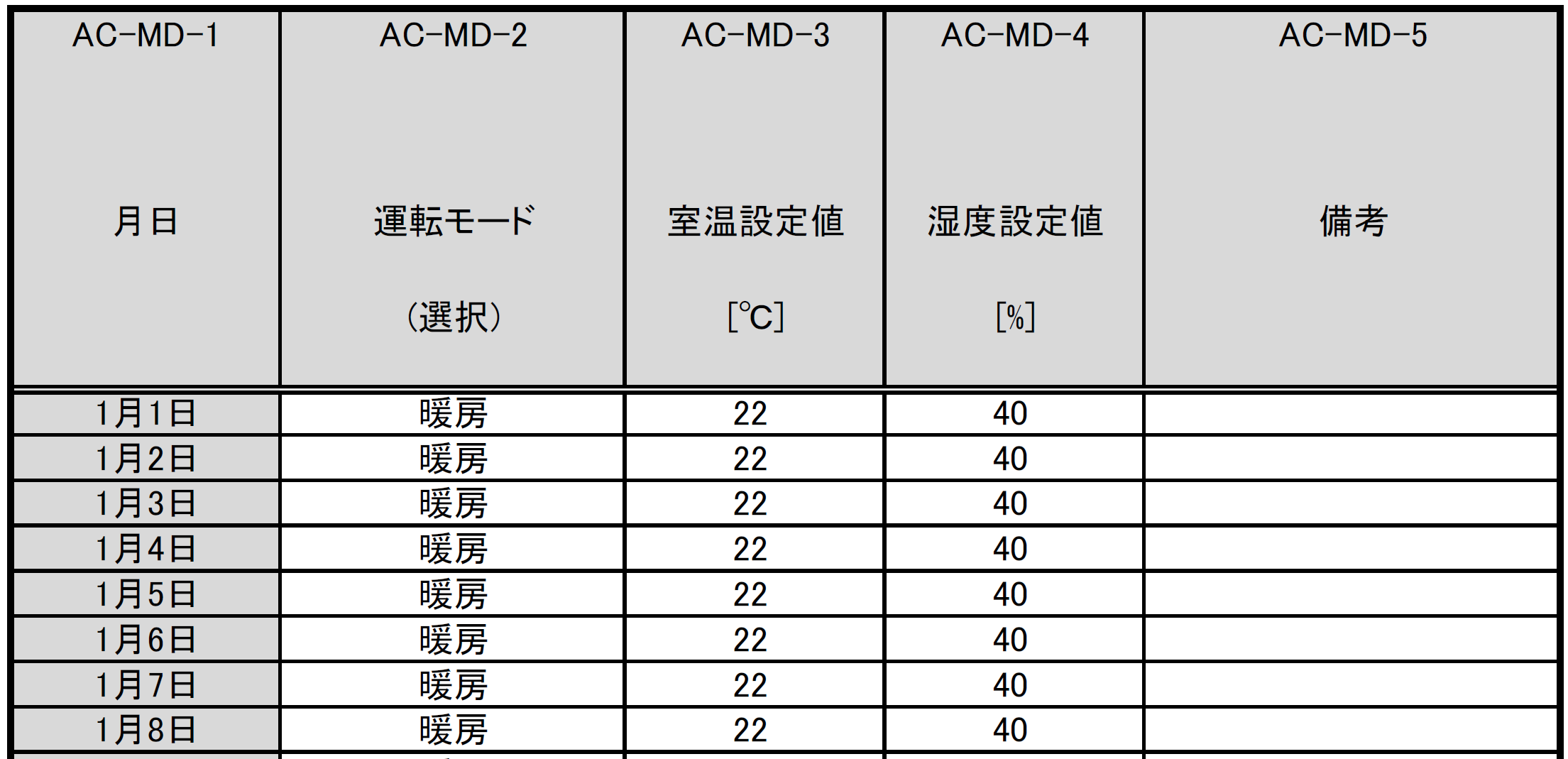
- [AC-MD-2] Operating mode
- Enter the air-conditioning operating mode—cooling or heating—for each day.
- [AC-MD-3] Room temperature setpoint
- Enter the room temperature setpoint for each day.
- [AC-MD-4] Humidity setpoint
- Enter the humidity setpoint for each day.
SP-AC-ST Daily Solar Heat Gain Coefficient Input Sheet
- You can enter the solar heat gain coefficient of openings.
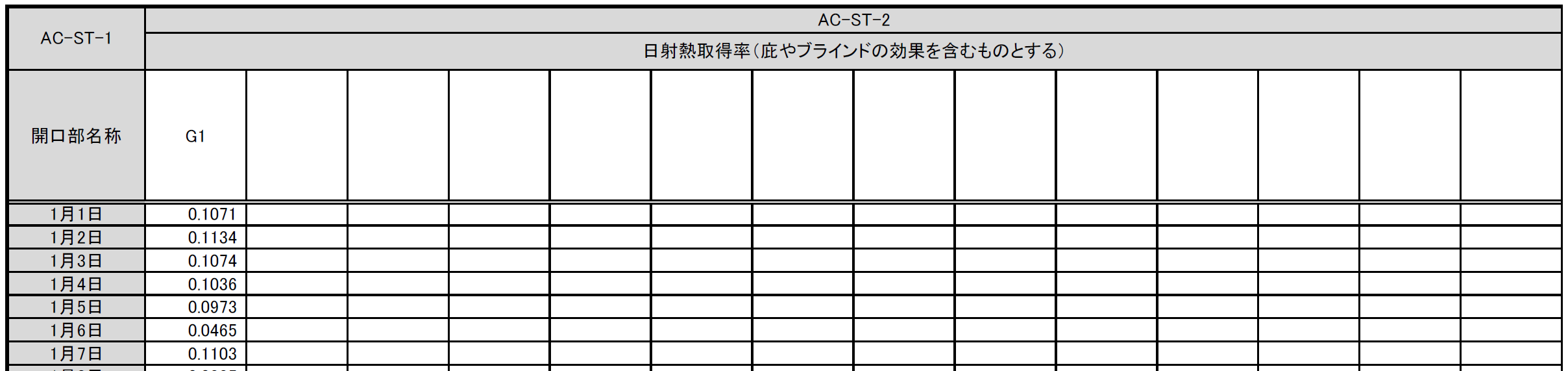
- [AC-ST-1] Opening name
- Enter the opening name. An opening with the same name must be entered in Form 2-3 because the specifications other than the solar heat gain coefficient are obtained from that entry.
- [AC-ST-2] Solar heat gain coefficient
- Enter the solar heat gain coefficient for each day, including the effects of eaves, blinds, and similar features.
SP-AC-RL Daily Room Load Input Sheet
- You can enter the daily integrated room load for each room in the air-conditioning system. The room load does not include the outdoor air load.
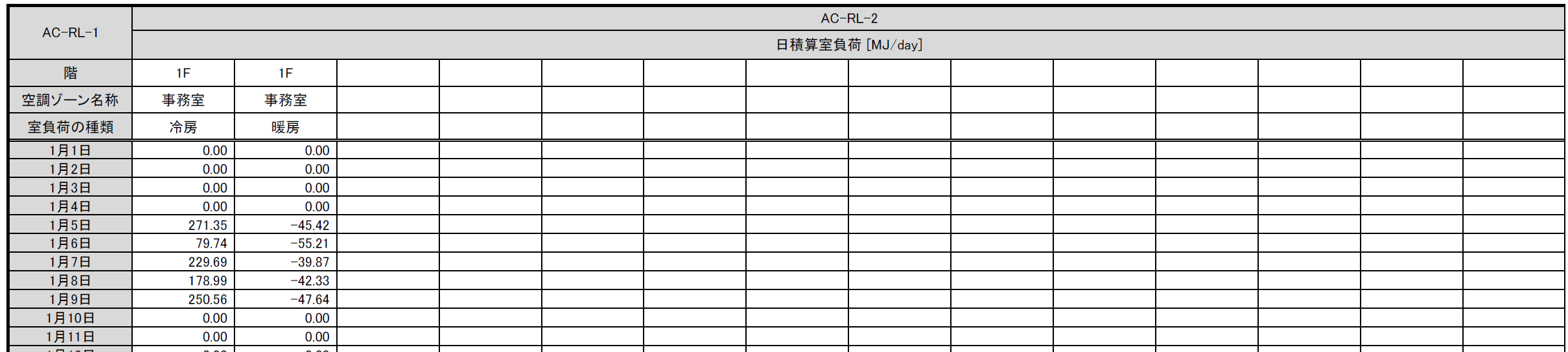
- [AC-RL-1] Floor, air-conditioned zone name, and room-load type
- Enter the floor and air-conditioned zone name defined in Form 2-1 and select the room-load type—cooling or heating.
- [AC-RL-2] Daily integrated room load
- Enter the daily integrated room load for each day. Enter cooling loads as positive values and heating loads as negative values.
- Both cooling and heating loads may occur on the same day. For example, heating may be required in the morning and cooling in the afternoon.
SP-AC-AL Hourly Air-Conditioning Load Input Sheet
- You can enter the air-conditioning load—room load plus outdoor air load—for each air-conditioning unit group. Enter a load that already accounts for all energy-saving technologies related to outdoor air treatment, including total heat exchangers, outdoor air cut control, and outdoor air cooling. When this sheet is used, the program does not separately account for the effects of these technologies.
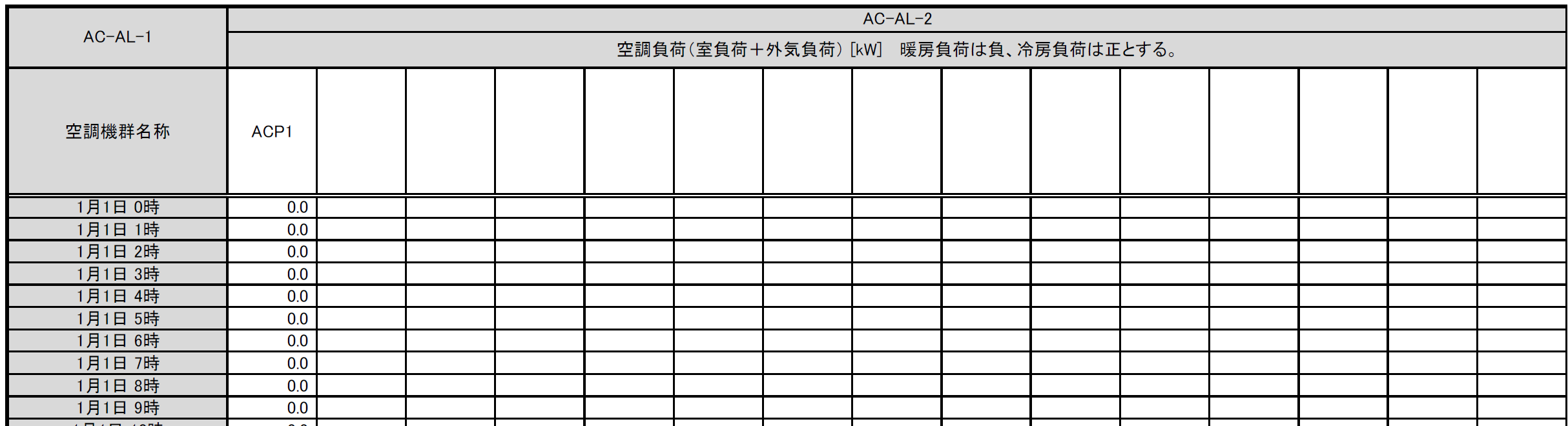
- [AC-AL-1] Air-conditioning unit group name
- Enter the air-conditioning unit group name. An air-conditioning unit group with the same name must be entered in Form 2-7.
- [AC-AL-2] Air-conditioning load
- Enter the air-conditioning load for each time step in kW. Enter heating loads as negative values and cooling loads as positive values. Enter 0 when the air-conditioning system is stopped.
SP-AC-HS Heat Source Equipment Characteristics Input Sheet
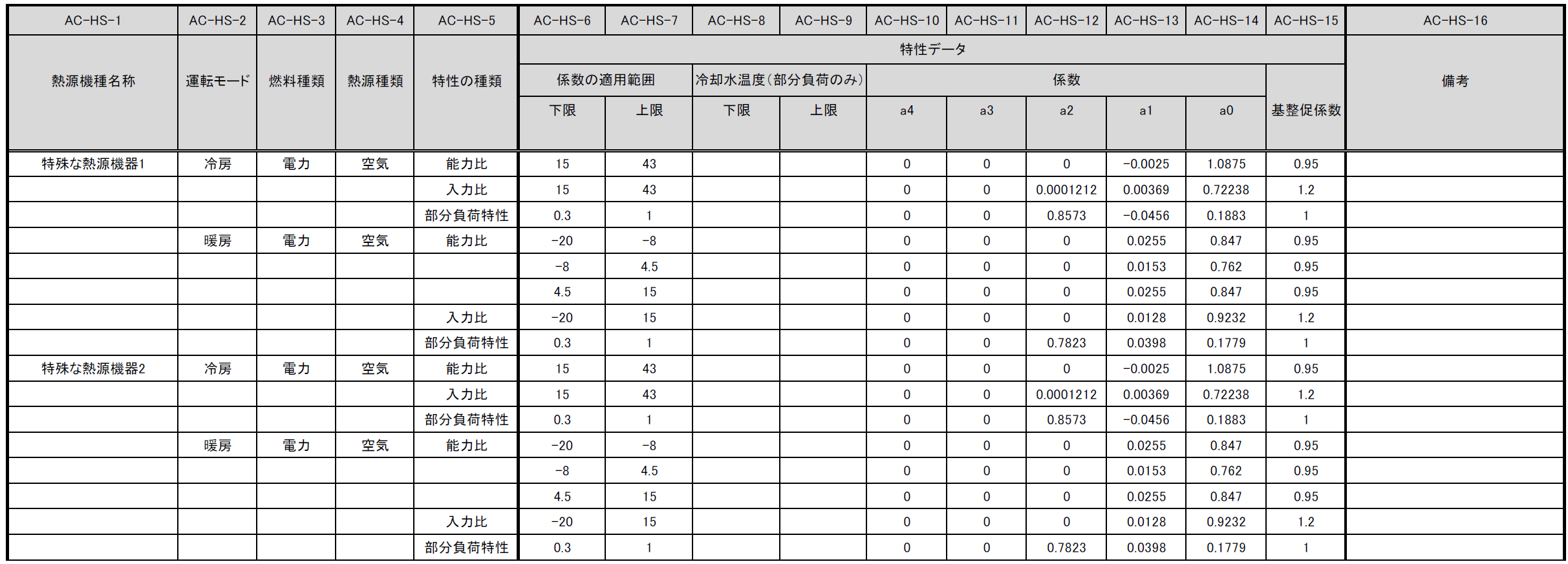
- You can define custom equipment characteristics for heat source equipment in an air-conditioning heat source group.
-
[AC-HS-1] Heat source equipment type name
- Enter a custom name for the heat source equipment type.
- Entering this name in ⑥ Heat Source Equipment Type of the Form 2-5: Heat Source Input Sheet allows energy consumption to be calculated using the characteristics specified on this sheet. The same name cannot be used more than once.
- A name already assigned to a heat source equipment type in WEBPRO cannot be used.
- To specify multiple Operating Mode and Characteristic Type entries for the same equipment type, leave the Heat Source Equipment Type Name cell blank and continue entering the additional characteristics on the following rows, as shown in the example.
-
[AC-HS-2] Operating mode
- Select whether the characteristics apply to cooling operation or heating operation.
- As with the heat source equipment type name, when specifying multiple characteristics for the same operating mode, leave the Operating Mode cell blank and continue entering the additional characteristics on the following rows.
-
[AC-HS-3] Fuel type
- Select the fuel type of the heat source equipment from the options in the following table.
- This selection determines the primary energy conversion factor used to convert the energy consumption of the heat source equipment into primary energy.
- Only one Fuel Type can be specified for each combination of Heat Source Equipment Type Name and Operating Mode.
| Option | Definition/Application | Notes |
|---|---|---|
| Electricity | Heat source equipment powered by electricity | |
| Gas | Heat source equipment powered by city gas | |
| Heavy oil | Heat source equipment powered by heavy oil | |
| Kerosene | Heat source equipment powered by kerosene | |
| Liquefied petroleum gas | Heat source equipment powered by liquefied petroleum gas (LPG) | |
| Steam | Heat source equipment powered by steam supplied from outside the heat source system | |
| Hot water | Heat source equipment powered by hot water supplied from outside the heat source system | |
| Chilled water | Heat source equipment powered by chilled water supplied from outside the heat source system |
- [AC-HS-4] Heat source type
- Select the heat source type of the equipment from the options in the following table. This selection determines which variable is used as the argument of the capacity-ratio and input-ratio functions.
- Only one Heat Source Type can be specified for each combination of Heat Source Equipment Type Name and Operating Mode.
| Option | Definition/Application | Notes |
|---|---|---|
| Air | Air-cooled heat source equipment | The capacity ratio and input ratio are functions of outdoor dry-bulb temperature in cooling mode and outdoor wet-bulb temperature in heating mode. |
| Water | Water-cooled heat source equipment | The capacity ratio and input ratio are functions of heat source water temperature (cooling-water temperature). |
| Not required | Combustion-type heat source equipment or other equipment that does not require an external heat source | The capacity ratio and input ratio are functions of outdoor dry-bulb temperature. |
- [AC-HS-5] Characteristic type
- Select the characteristic type from the options in the following table.
- To specify multiple characteristics for the same combination of Heat Source Equipment Type Name and Operating Mode, leave the cells from Heat Source Equipment Type Name through Heat Source Type blank and continue entering the additional characteristics on the following rows, as shown in the example.
| Option | Definition/Application | Notes |
|---|---|---|
| Capacity ratio | Use when entering how the maximum capacity varies | The independent variable of the capacity ratio depends on the option selected for ④ Heat Source Type. |
| Input ratio | Use when entering how the maximum input varies | The independent variable of the input ratio depends on the option selected for ④ Heat Source Type. |
| Part-load characteristics | Use when entering how the input varies with the load factor | The part-load characteristics are a function of the load factor. |
| Supply-water temperature characteristics | Use when entering how the input varies with the supply-water temperature | The supply-water temperature characteristics are a function of the supply-water temperature. |
-
[AC-HS-6]–[AC-HS-7] Lower and upper bounds of the coefficient application range
- Specify the application range of the characteristic data.
- The variable whose range is specified depends on the function represented by the Characteristic Type, which in turn depends on the selected Heat Source Type.
- For example, if Operating Mode is Cooling, ④ Heat Source Type is Water, and Characteristic Type is Capacity Ratio, enter the heat source water temperature range.
-
[AC-HS-8]–[AC-HS-9] Lower and upper cooling-water temperatures (part-load characteristics only)
- When Heat Source Type is Water and Characteristic Type is Part-Load Characteristics, enter the application range for each characteristic here if the characteristics are to vary with cooling-water temperature. Otherwise, leave these fields blank.
- When entering characteristic data for multiple ranges, the Lower Bound of Coefficient Application Range and Upper Bound of Coefficient Application Range fields cannot be left blank; values must also be entered in those cells.
-
[AC-HS-10]–[AC-HS-14] Characteristic-data coefficients
- Heat source characteristics can be specified as a fourth-degree polynomial. Enter the coefficients of the function representing the characteristics.
a4is the coefficient of the fourth-degree term,a3of the third-degree term,a2of the second-degree term,a1of the first-degree term, anda0is the intercept.
-
[AC-HS-15] Characteristic-data on-site performance adjustment factor
- WEBPRO applies an adjustment factor to account for the difference between performance measured in a laboratory or similar facility and actual performance after installation in a building. Enter that factor here.
- Enter
1to perform the calculation without this adjustment.
SP-AC-WT Daily Heat Source Supply-Water Temperature Input Sheet
- You can enter the supply-water temperature for each heat source group.
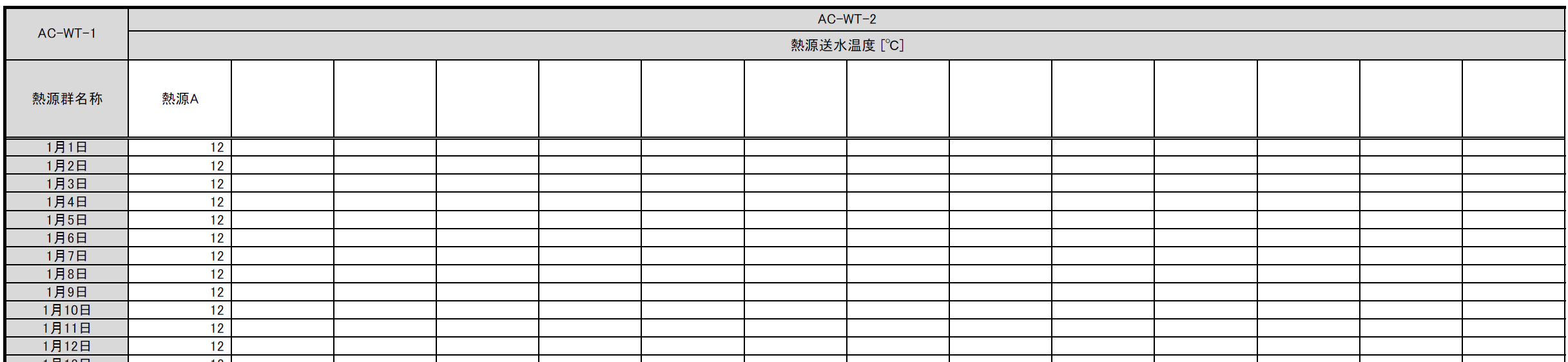
- [AC-WT-1] Heat source group name
- Enter the heat source group name. A heat source group with the same name must be entered in Form 2-5.
- [AC-WT-2] Heat source water temperature
- Enter the daily supply-water temperature.
SP-AC-CW Daily Heat Source Cooling-Water Temperature Input Sheet
- You can enter the cooling-water temperature for each heat source group.
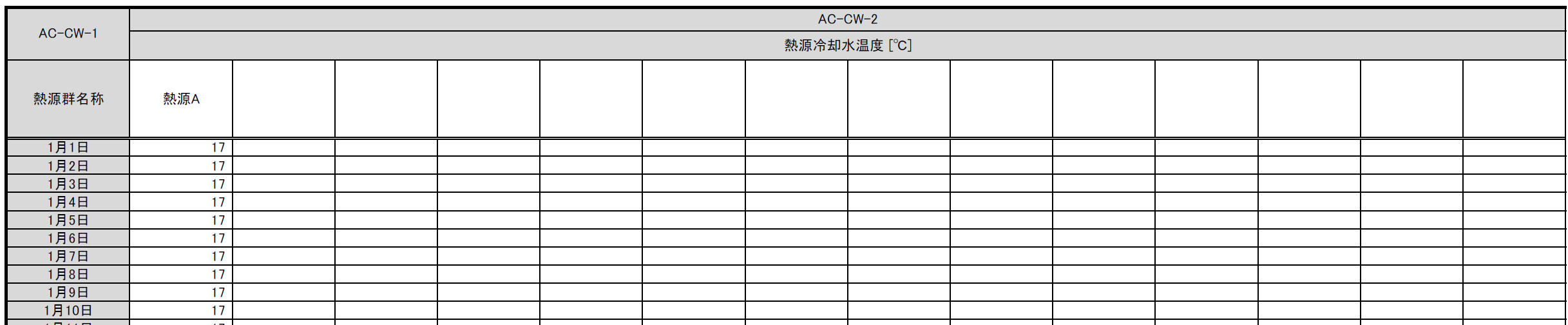
- [AC-CW-1] Heat source group name
- Enter the heat source group name. A heat source group with the same name must be entered in Form 2-5.
- [AC-CW-2] Heat source water temperature
- Enter the daily cooling-water temperature.
SP-AC-FC Variable Air Volume/Variable Water Volume Control Characteristics Input Sheet
- You can define custom energy-consumption characteristics for variable water volume control of secondary pump groups and variable air volume control of air-conditioning unit groups.
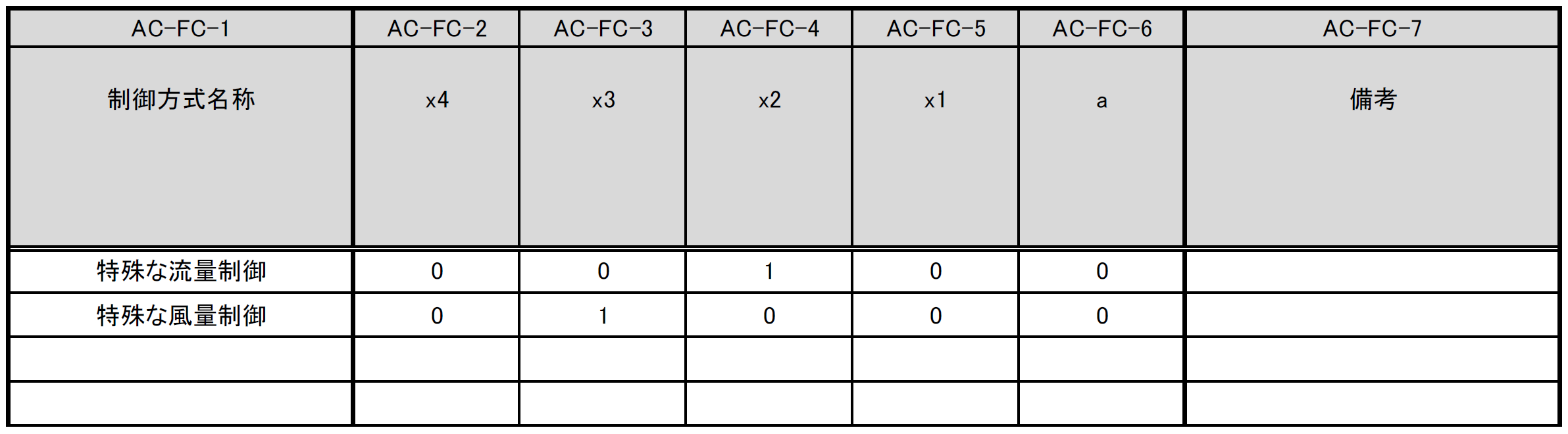
- [AC-FC-1] Control method name
- Enter a custom control method name. Entering this name in ⑧ Flow Rate Control Method of the Form 2-6: Secondary Pump Input Sheet or ⑪ Airflow Control Method of the Form 2-7: Air Conditioner Input Sheet allows energy consumption to be calculated using the characteristics specified on this sheet.
- [AC-FC-2] Coefficient x4
- Enter the coefficient of the fourth-degree term in the fourth-degree polynomial of the load factor.
- [AC-FC-3] Coefficient x3
- Enter the coefficient of the third-degree term in the fourth-degree polynomial of the load factor.
- [AC-FC-4] Coefficient x2
- Enter the coefficient of the second-degree term in the fourth-degree polynomial of the load factor.
- [AC-FC-5] Coefficient x1
- Enter the coefficient of the first-degree term in the fourth-degree polynomial of the load factor.
- [AC-FC-6] Coefficient a
- Enter the intercept of the fourth-degree polynomial of the load factor.